The mysterious "Cloud"
Search

Pittsburgh Tech Guy

Phone: 412-256-8674

Email: pghtechguy@hotmail.com

Skype: pghtechguy on Skype


How to Backup your computer online for free

Welcome to the Pittsburgh Tech Guy!  Your local source for good, dependable technical support and information!  Keep up with the latest Tech news here!

Remember, all home computer analysis are free!

Monday
Nov112013

Best Buy takes Black Friday to an obscene level

The company has decided that it's not good enough to entice shoppers to begin their Black Friday shopping at midnight, when the turkey is digested and the Wild Turkey is absorbed.

Instead, the doors of your local Best Buy will open at 6 p.m.

A Best Buy spokeswoman told the Associated Press that this is what the American people want: "Last year customers clearly showed that they wanted to be out shopping much earlier on Thanksgiving."

I am not sure whether the American people expressed themselves by lining up at 6 p.m. precisely or whether they inundated Best Buy with a promise to start their own Thanksgiving festivities at 11 a.m.

The disappointing aspect of this is that almost all of the Black Friday deals, really aren't great deals that you can't get any other time of the year.  Shop away America!

Sunday
Nov032013

Finally!, you can manage all your online storage in one interface!

Using a large number of cloud storage services can lead to the nuisance of not being able to manage each of them efficiently. That’s where services like MultCloud aim to offer a handy solution by letting your control and manage your cloud accounts from one unified interface. Based entirely online, it lets you create a MultCloud profile, to which you can connect your other cloud storag services for easy access and management. The service currently supports most major cloud storage providers including Dropbox, SugarSync, Google Drive, SkyDrive, Box and Amazon S3.


MultCloud is quite easy to configure, and takes only a couple of minutes  for setting things up. It doesn’t require you to enter a lot of details – just your email address, name and password would do. Once you visit the website (via the link provided at the end of this post), you can click the ‘Create An Account’ button to get started. Once an account has been created, just make sure to verify your email address with the service from the link provided in the confirmation email that’s sent to your inbox.

MultCloud - one app for simultaneous management of your multiple cloud drives

Next, you just need to enter your email address and password at the login screen after the verification to finally log in to your account – it’s simple as that.

MultCloud - Put multiple cloud drives into one.

Once a cloud service account has been added, you can do pretty much everything from it that could possibly be done from a dedicated client or web interface of that service. For example, you can easily view contents of your cloud storage, upload files to it, download existing cloud files to your local storage, and create new folders. MultCloud also offers a preview feature for some files such as images. Other than that, you can rename your files and copy and move them between different cloud folders.

Overall, MultCloud is a great service that keeps things simple while taking the hassle of controlling all your cloud accounts from different browser tabs or desktop clients out of the way. The service is currently available for free.

Sunday
Nov032013

Black Friday has begun at Amazon

Now that Halloween has come and gone, Amazon is ready for the holiday shopping season to begin.

The online retail giant on Friday kicked things off with the launch of a Black Friday deals store and electronics holiday gift guide. The deals store will offer discounts on thousands of items from the likes of Hasbro, Samsung, Canon, Belkin, and more now through Black Friday weekend.

In addition, for the first time ever, Amazon will offer two "Deals of the Day" every day through Dec. 22. The company said there will also be "hundreds of Lightning Deals" every week.

If you're not sure what to get someone on your list, you might want to check out Amazon's electronics gift guide featuring 350 of the most popular gifts of the season. The guide is organized by category and recipient, offering ideas of what to get for everyone "from the music enthusiast to the gadget guru." The gift guide will also feature "60 gifts in 60 days" with a new deal on an electronics gift every day through Dec. 31.

"We're making it easy for customers to discover and zero in on the hottest gifts and holiday trends — from streaming media players to Bluetooth portable speakers," Ben Hartman, vice president of consumer electronics for Amazon.com, said in a statement.

Amazon is naturally pushing its own Kindle tablets this holiday season, but also predicted that wireless gadgets such as Bluetooth speakers and headphones from Beats, Sonos, and TDK will be popular. Other hot electronics gifts this holiday season include lightweight PCs from companies like HP and Acer, 65-inch or larger TVs, 4K Ultra HD resolution TVs, and streaming media players and TV soundbars from Sony, Samsung, and Roku.

Meanwhile, Amazon customers will now need to spend $35 to qualify for free shipping, up from $25. Amazon raised the free shipping threshold last week for the first time in more than 10 years. Those who sign up for the $79-per year Amazon Prime, however, get free, two-day shipping on all orders.

Sunday
Nov032013

Identify those who are tracking you with Firefox Add-On, Lightbeam

You are being stalked, right now, at this very moment. And by that, I mean your personal information is considered a very hot commodity among people you have never even met.

We all leave behind little bits of personal information with every new new step in our digital footprint: What sites we visit, what searches we conduct, what links we follow, and so on. Collecting that information is big business. Every time you visit a website—even this one—a ripple of data is sent through the Internet, often without our knowledge and sometimes without our consent. Lightbeam, a visually striking new add-on from Mozilla, helps illuminate the sometimes-invisible connections that weave our digital lives.

Firefoxers can find the Lightbeam add-on here. Once installed, users will find the Lightbeam logo in the bottom right of the browser. Clicking it will open a new tab with three visualization options: Graph, Clock, and List.

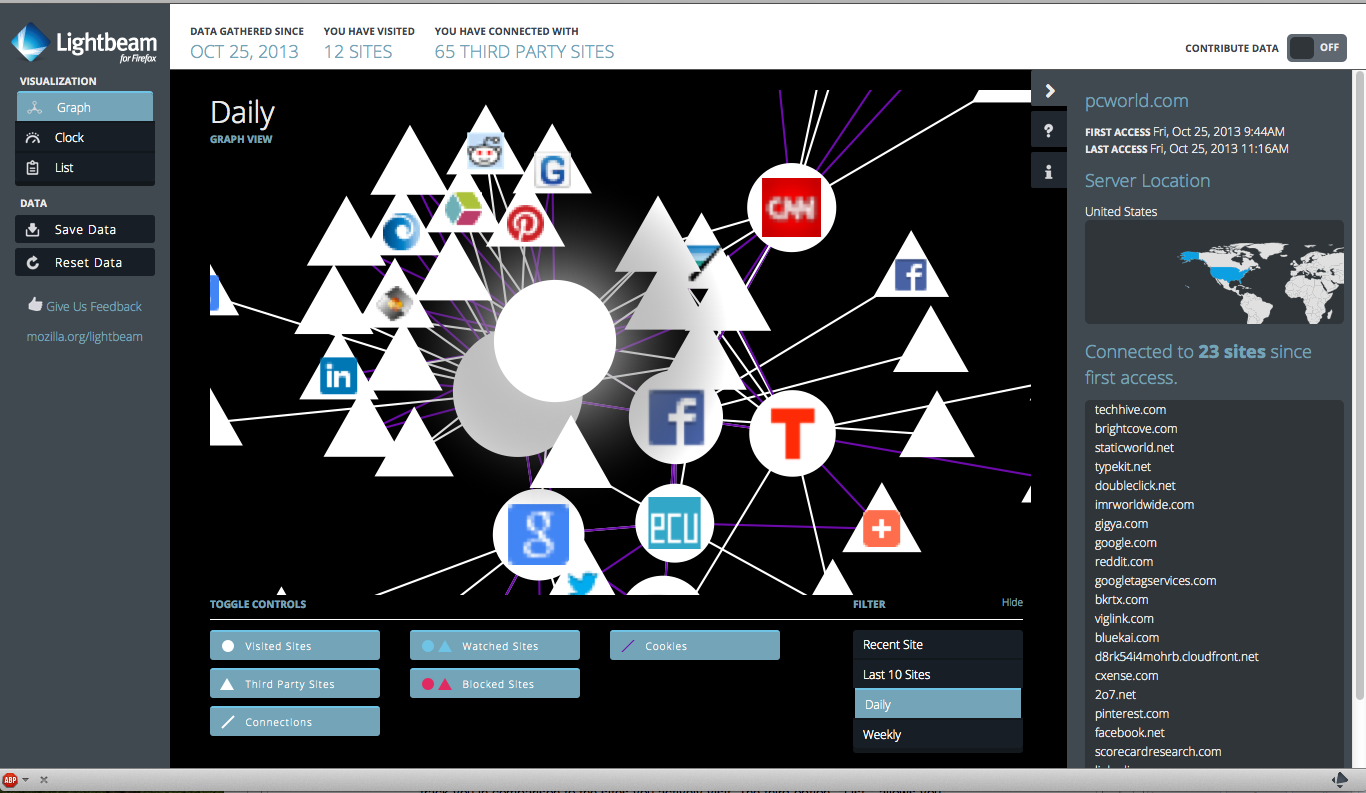
The default Graph option creates an zoomable, interactive visualization of your Web activity. Every time you voluntarilly visit a site, Lightbeam records this hit with a circle icon. Lightbeam assigns a triangle icon for every third-party site actively sucking data from the page you visited. Each site you visit is visually connected with a drawn line; a purple line means that a cookie is involved in the data transfer. Each site icon will be sized according to the amount of connections, and each icon will be closer to other icons depending on how many connections they share.
LightbeamNot all tracking is bad, but did you realize how much is actually taking place?

Two things become instantly apparent when using Lightbeam's Graph visualization: 1) The tangled nature of your digital connections will make you appreciate the metaphor of "the Web"; and 2) you realize the exponentially greater number of third-party sites tracking your activity compared with the ones you voluntarily visit.

Sunday
Nov032013

Microsoft warns XP users again...time is almost up!

Microsoft yesterday again but the scare into Windows XP users, telling them that after April 8, 2014, the chance that malware will infect their PCs could jump by two-thirds.

The claim, made by Tim Rains, director of Microsoft's Trustworthy Computing group, came on the heels of the release of the company's twice-annual Security Intelligence Report ( download PDF).

Following up on comments he made in August, Rains again warned Windows XP stragglers to expect an increase in attacks when the aged operating system exits support in five months.

"After end of support, attackers will have an advantage over defenders who continue to run Windows XP," Rains asserted in a Tuesday post to a company blog. "After April next year, when we release monthly security updates for supported versions of Windows, attackers will try and reverse engineer them to identify any vulnerabilities that also exist in Windows XP. If they succeed, attackers will have the capability to develop exploit code to take advantage of them."

Rains then went a step further, and cited statistics from Microsoft's own telemetry-gathering efforts to give customers an idea of the increased threat after support ends.

"We have already had a glimpse into what happens when a Windows XP-based platform goes out of support," Rains added. "In the two years after Windows XP Service Pack 2 went out of support, its malware infection rate was 66% higher than Windows XP Service Pack 3 -- the last supported version of Windows XP."

Support for Windows XP Service Pack 2 (SP2) ended in July 2010, a little over two years after the release of XP SP3.

Friday
Nov012013

So How rich (or poor) are you? Find out ..

They say money can’t buy happiness but it’s more comfortable to be sad in a Mercedes than to be so on the sidewalk. But even if we own all the fancy toys that we want in life, we still can’t have it all, as coming across someone who has more than us in this connected age is quite likely even for those born with a silver spoon in their mouth. If you have ever wondered what’s your current wealth really worth in comparison to the rest of the world? You might be surprised to learn how high you rank after using Global Rich List – site that compares your wealth and income against all others in the world, and tells you some really interesting facts about your monetary status.

Global Rich List is run and maintained by Poke London, a UK based marketing firm that specializes in social media, e-commerce, digital architecture and mobile advertising. Poke cites that the website uses complex algorithms for analyzing data fetched via real-time financial API’s to present the required information to the users. When launched, you’re presented with a barebones interface. The site allows you to see the comparative value of your annual income and overall wealth by clicking the pertaining choices.

For instance, if you want to analyze and compare your annual income, simply select your location and currency from the drop down menu, and specify your accurate annual net income, followed by clicking ‘Show my results’.

Have fun ranking yourself!